
3D aligner treatment viewer
How to Choose a 3D Aligner Treatment Viewer for Your Lab
A practical checklist for choosing a 3D aligner treatment viewer: browser support, staged treatment animation, IPR, attachments, views and mobile performance.
· 2 min read · DentoSim
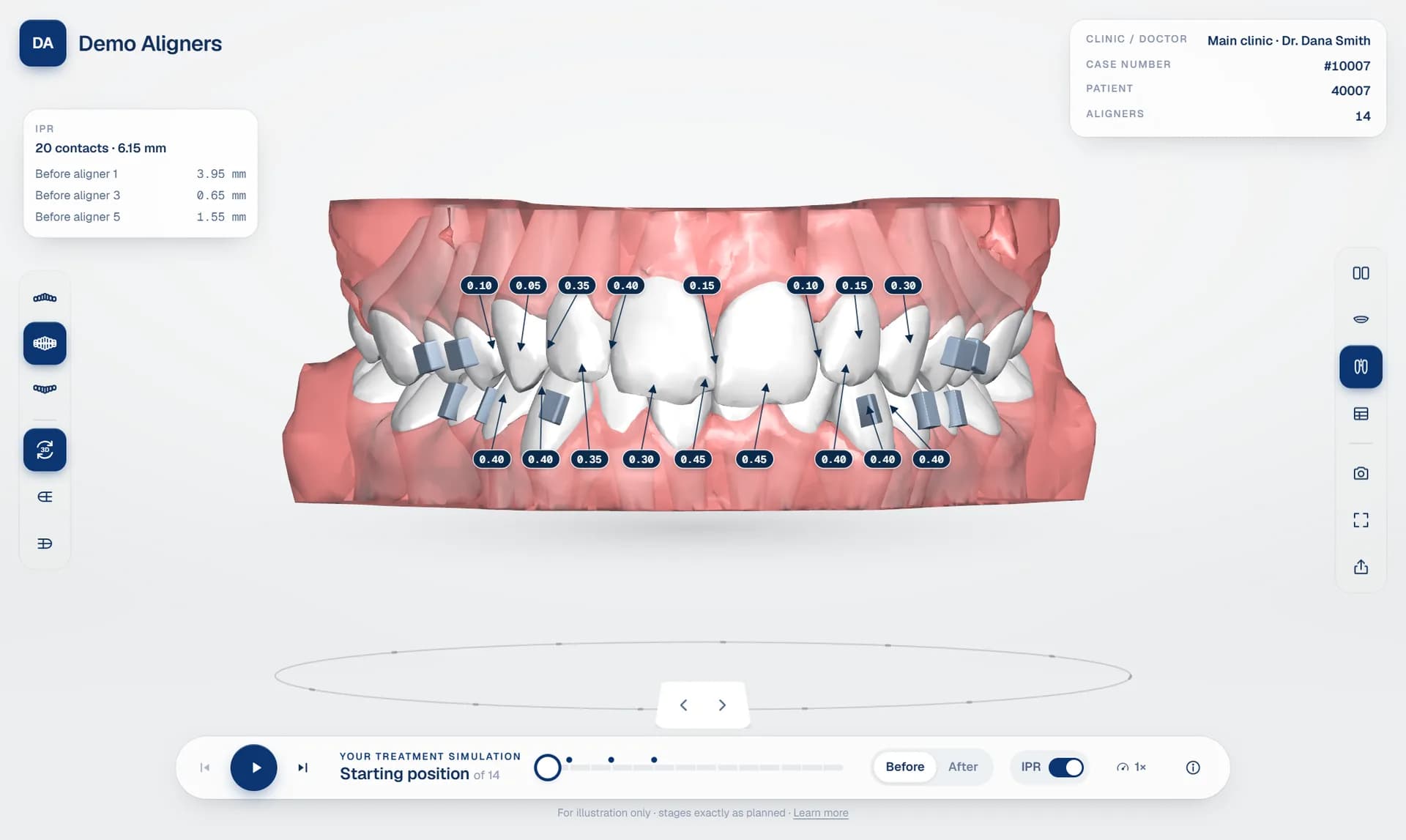
The 3D viewer is the part of your workflow that doctors and patients actually see. It can make a well-designed treatment plan look clear and convincing, or make it look confusing. This guide covers what separates a good 3D aligner treatment viewer from a basic model viewer.
1. It must run in the browser
A browser-based dental 3D viewer removes the biggest obstacle: installation. Doctors use a mix of Windows PCs, Macs, iPads and phones, and patients almost always open links on a phone. If the viewer needs a download, a plugin or a specific operating system, many of them will never open it.
Check that the viewer loads quickly on a mid-range phone over a mobile connection. A viewer that is beautiful on a workstation but takes a minute to load on a phone will lose patients.
2. Smooth, staged treatment animation
A staged aligner treatment animation should show teeth gliding from aligner to aligner, not jumping between separate models. Smooth playback makes the plan easier to follow and looks far more professional. The gums should move with the teeth rather than flicker between stages.
Look for play, pause, step forward and back, a timeline you can scrub, and a quick way to jump to the start and the final result.
3. The clinical details
- IPR values in millimetres at each contact, with the aligner each reduction happens before. See aligner IPR visualisation.
- Attachments shown on the teeth, at the stage they are placed. See the aligner attachment viewer.
- The tooth movement table from the planning software, per tooth. See the tooth movement table explained.
4. The right views
Doctors want to check the plan from every side. A good viewer offers front, left, right and occlusal views, upper only, lower only or both arches, an open-mouth view, and side-by-side or overlaid start and result. Patients need fewer controls: play, before and after, and the bite.
5. Different views for doctors and patients
The doctor's view should be a review tool, with approval, change requests and chat. The patient's view should be simple and reassuring. One viewer with two modes keeps the plan consistent while giving each audience what it needs. More on that in before and after simulations for patients.
6. Your brand
If the viewer shows someone else's logo, you are advertising for them. A white label aligner viewer carries your logo, colours and domain.
Try it on your own cases
DentoSim's 3D aligner treatment viewer covers everything on this list. The fastest way to judge any viewer is to upload one of your own treatment plans, so every lab gets free cases to start. Register your lab.
Frequently asked questions
Does a 3D aligner viewer work on phones?
A browser-based viewer does. It runs in Safari or Chrome on the phone, so patients can open it from a link without installing anything.
What file formats can a 3D aligner treatment viewer use?
It depends on the platform. DentoSim recognises exports from the top treatment planning software and also accepts staged STL, OBJ, PLY, 3MF and GLB files.
See it on your own treatment plans
DentoSim turns aligner treatment plans into 3D simulations for doctors and patients, under your lab's brand.